Scrapy 是一种用于抓取网站和提取结构化数据的应用程序框架,可用于广泛的有用应用程序,如数据挖掘、信息处理或历史存档等。
安装 Scrapy
从 PyPI 安装:
1
pip install Scrapy
使用 Anaconda 或 Miniconda 安装:
1
conda install -c conda-forge scrapy
安装后可在命令行查看是否成功:
1
2
3
4
5
6
7
8
9
10
11
12
13
14
15
16
17
18
19
20
> scrapy
Scrapy 1.6.0 - no active project	# 因为尚未新建 scrapy 项目

Usage:
  scrapy <command> [options] [args]

Available commands:
  bench         Run quick benchmark test
  fetch         Fetch a URL using the Scrapy downloader
  genspider     Generate new spider using pre-defined templates
  runspider     Run a self-contained spider (without creating a project)
  settings      Get settings values
  shell         Interactive scraping console
  startproject  Create new project
  version       Print Scrapy version
  view          Open URL in browser, as seen by Scrapy

  [ more ]      More commands available when run from project directory

Use "scrapy <command> -h" to see more info about a command
初试 Scrapy
以爬取一个列出著名作家语录的外国网站 quotes.toscrape.com 为例。
ps.官方中文教程使用的 http://dmoz.org 已经无法访问了
第1步:创建项目
1
2
> cd D:\your_path
> scrapy startproject tutorial
将创建一个包含以下内容的 tutorial 目录:
1
2
3
4
5
6
7
8
tutorial/
    scrapy.cfg
    tutorial/
        __init__.py
		...
        settings.py
        spiders/        # 放置spider代码的目录【入门时重点关注】
            __init__.py
第2步:编写代码
(实际上在此之前还有分析网页结构的过程)
将以下代码保存到 tutorial/spiders 下的 quotes_spider.py 文件中:
1
2
3
4
5
6
7
8
9
10
11
12
13
14
15
16
17
18
19
20
21
22
23
24
25
import scrapy

# 定义一个类,继承于 scrapy.Spider 父类
class QuotesSpider(scrapy.Spider):
    # 定义 spider 的名称,便于命令行识别
    name = "quotes"
    # 需要爬取的(首页)网址
    start_urls = [
        'http://quotes.toscrape.com/page/1/',
    ]

    # 利用 Xpath 解析 response 提取需要的信息(官方教程使用的 csss 选择器)
    def parse(self, response):
        for quote in response.xpath('//div[@class="quote"]'):
            yield {
                'text': quote.xpath('./span[@class="text"]/text()').get(),
                'author': quote.xpath(('.//small[@class="author"]/text()').get(),
                'tags': quote.xpath('.//div[@class="tags"]/a[@class="tag"]/text()').getall(),
            }

        # 【下一页】的 url(/page/n/) 存在时则拼接完整后访问,实现自动循环抓取
        next_page = response.xpath('//li[@class="next"]/a/@href').get()
        if next_page is not None:
            next_page = response.urljoin(next_page)
            yield scrapy.Request(url=next_page, callback=self.parse)
第3步:运行爬虫
转到项目的顶级目录并运行:
1
2
> cd tutorial
> scrapy crawl quotes					# 直接运行
第4步:保存数据
直接在上一步的基础上增加命令行参数即可:
1
2
> scrapy crawl quotes -o quotes.json	# 运行并将结果保存到 quotes.json
> scrapy crawl quotes -o quotes.csv     # 运行并将结果保存到 quotes.csv
输出内容类似如下:
1
2
3
4
5
6
7
8
9
10
11
12
13
14
2019-04-30 23:16:39 [scrapy.utils.log] INFO: Scrapy 1.6.0 started (bot: scrapy_spider)
...
2019-04-30 23:16:43 [scrapy.core.scraper] DEBUG: Scraped from <200 http://quotes.toscrape.com/page/1/>
{'text': '“The world as we have created it is a process of our thinking. It cannot be changed without changing our thinking.”', 'author': 'Alb
ert Einstein', 'tags': ['(about)', 'change', 'deep-thoughts', 'thinking', 'world']}
...
{'text': "“A person's a person, no matter how small.”", 'author': 'Dr. Seuss', 'tags': ['(about)', 'inspirational']}
2019-04-30 23:16:47 [scrapy.core.scraper] DEBUG: Scraped from <200 http://quotes.toscrape.com/page/10/>
{'text': '“... a mind needs books as a sword needs a whetstone, if it is to keep its edge.”', 'author': 'George R.R. Martin', 'tags': ['(about
)', 'books', 'mind']}
2019-04-30 23:16:47 [scrapy.core.engine] INFO: Closing spider (finished)
...
 'start_time': datetime.datetime(2019, 4, 30, 15, 16, 42, 286835)}
2019-04-30 23:16:47 [scrapy.core.engine] INFO: Spider closed (finished)
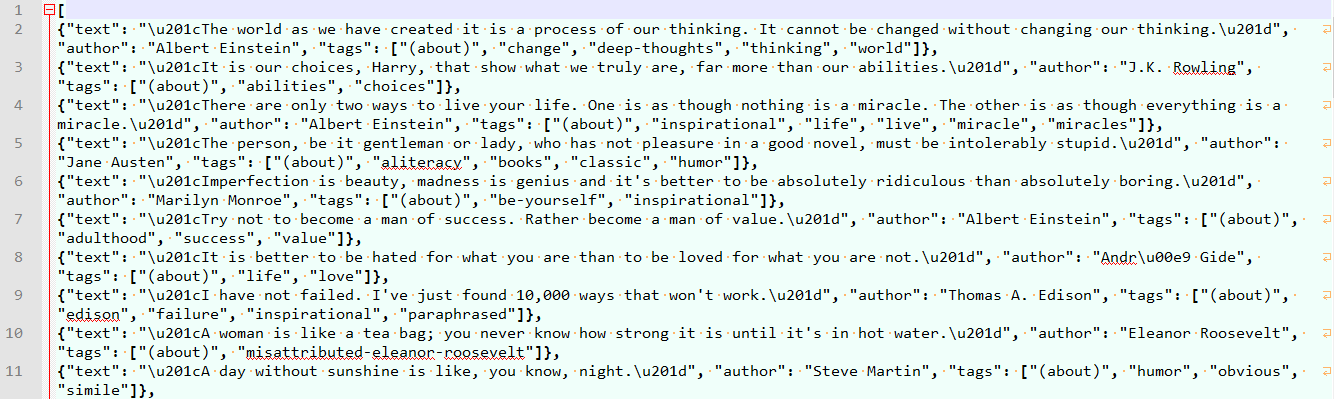
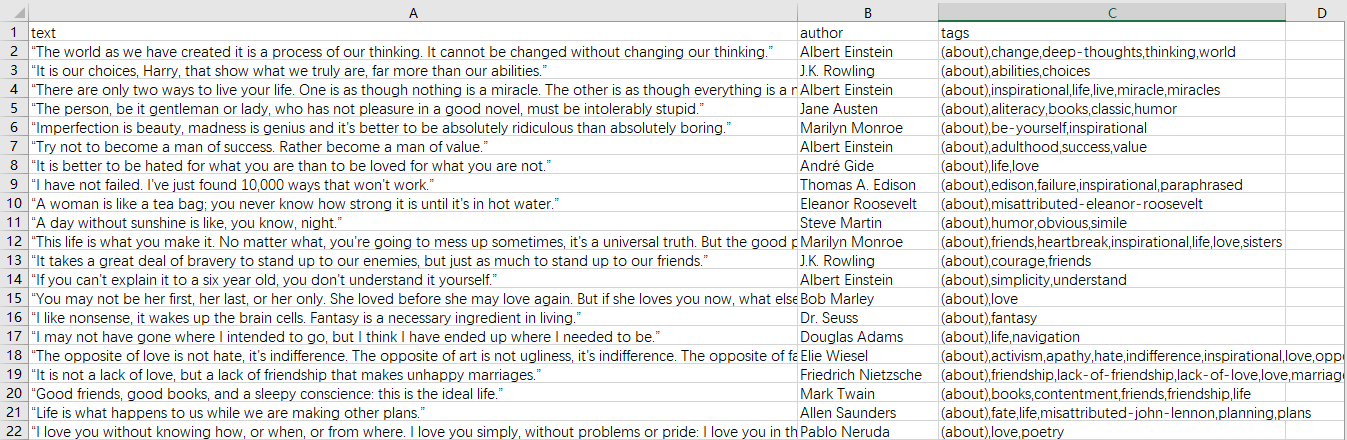
结果展示
quotes.json
quotes.csv
刚接触和学习 Scrapy,行文较仓促,主要是记录和分享一下改写的示例代码,同时也是 Scrapy 项目的通用步骤。 已测试可顺利爬取 51job 的职位,节后再增加解析职位详情信息。